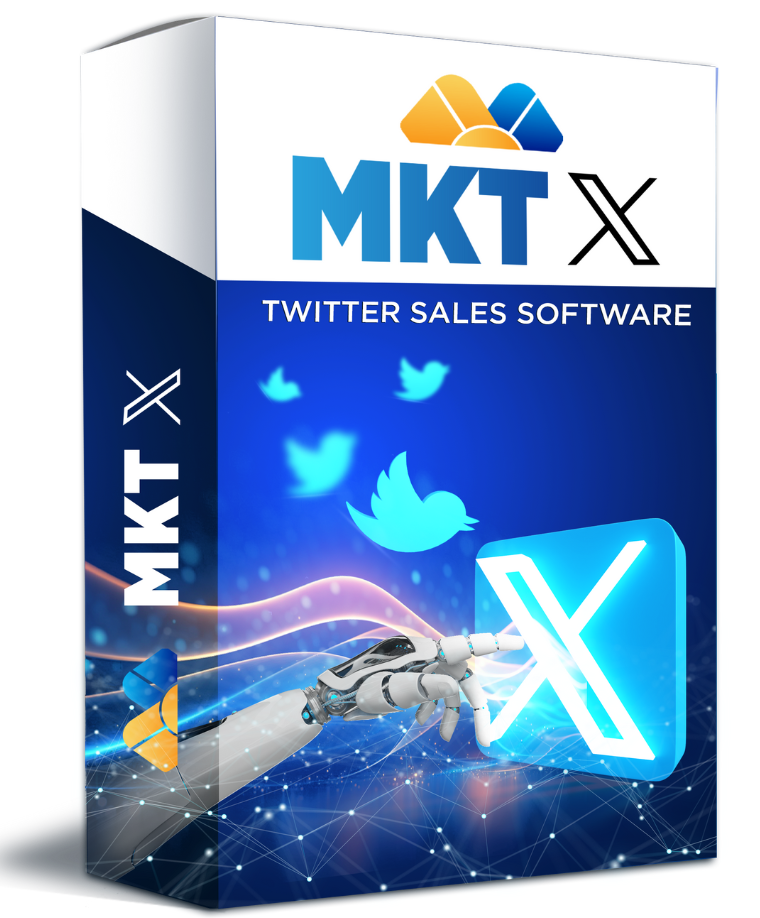
An auto tweet for Twitter tool is the difference between a brand that posts once a week and one that scales to 50–500 X accounts in 2026. In this guide we look at how MKT X – a dedicated auto tweet for Twitter solution – lets agencies, e-commerce stores and personal brands push content around the clock, grow real communities and turn Twitter / X from a manual chore into a predictable growth engine you can budget, forecast and scale.
I. What is an auto tweet for Twitter tool – MKT X overview
An auto tweet for Twitter tool is a piece of marketing software that schedules, publishes and distributes tweets across many X accounts at the same time. Instead of opening browser tabs, copying captions and uploading media manually, you load your content library once and the tool runs the entire calendar – weekdays, weekends and holidays included, with full audit logs for every account.
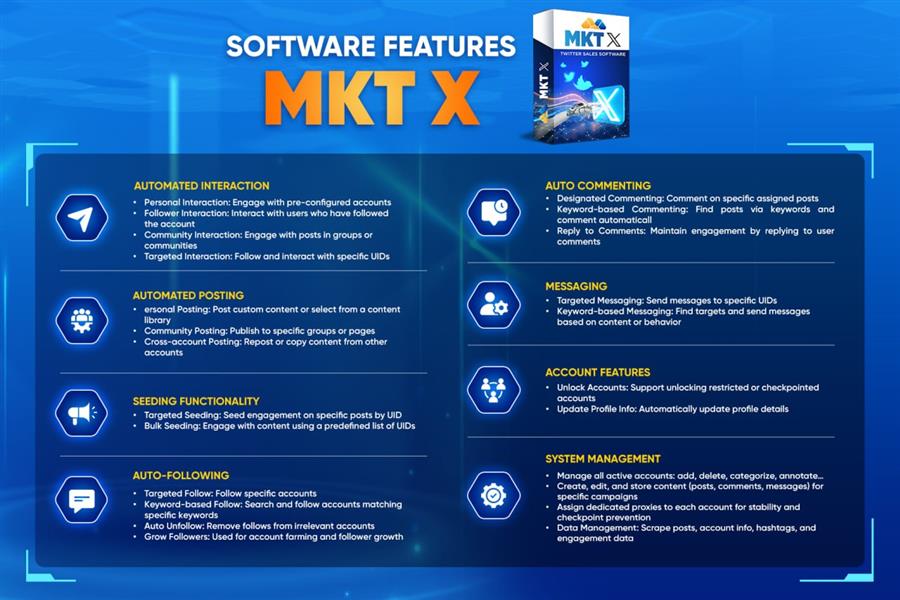
MKT X is built specifically for that workload. The auto tweet for Twitter engine inside MKT X manages large pools of accounts with dedicated proxies, rotates captions and media to keep each tweet unique, follows and unfollows on schedule, and reacts to keywords in real time. For agencies, e-commerce stores, crypto projects and personal brands, MKT X turns Twitter into a channel you can budget, forecast and scale exactly like any other paid acquisition source.
If you are completely new to social automation, you may also want to read our Twitter automation tool overview for 2026 – it covers the broader landscape and explains why a dedicated auto tweet for Twitter stack beats generic schedulers when you are running more than a handful of accounts.
II. Why you should use an auto tweet for Twitter tool in 2026
- Save dozens of hours every week: One operator can run 50–500 X accounts from a single dashboard, removing the bottleneck of manual posting and freeing your team for strategy and creative work that machines cannot replace.
- Stay consistent with the X algorithm: X clearly rewards accounts that post several times a day with replies and engagement. A serious auto tweet for Twitter setup makes that frequency realistic without sacrificing quality or burning out your team.
- Run multi-niche campaigns in parallel: Cluster accounts by topic (fashion, fintech, gaming, SaaS) and push tailored content to each cluster from the same control panel, with separate proxies and warmed-up histories for each cluster.
- Analyse what really works: Centralised reporting on impressions, clicks, replies, profile visits and follower growth makes A/B testing captions, hashtags and timing effortless – in days, not months.
- Lock in a predictable cost-per-tweet: Once the system is set up, scaling from 10 to 100 accounts is mostly a question of more proxies and content – not more salaries, not more management overhead.
- React faster to trends: A good auto tweet for Twitter stack lets you push a single piece of content to dozens of accounts the moment a trending topic appears, instead of missing the window.
III. How to post in bulk effectively using an auto tweet for Twitter tool
Running an auto tweet for Twitter campaign is not just “press play” – operators who get the best results follow a clear, repeatable playbook. Here is the five-step flow we recommend with MKT X, refined across thousands of real campaigns shipped by MKT Software customers:
- Create a dedicated campaign: Group every account that should share the same content theme and tone of voice. A campaign acts as the single source of truth for media, captions, posting cadence and KPIs, so you never end up with stray accounts posting off-brand content.
- Configure accounts & proxies: Import the account list, assign one clean residential or mobile proxy per account, and warm new accounts up gradually over 7–14 days. Avoid mass actions on the first day – X is aggressive against accounts that go from zero to hero overnight.
- Prepare the content library: Upload images, GIFs, short videos and write multiple caption variations. Use spintax or template libraries so each tweet feels human-written, avoids near-duplicate detection, and stays inside your brand voice across every account.
- Customise the schedule: Spread tweets across the day with randomised gaps so the activity pattern looks human. Mix original tweets, replies, retweets and quote tweets to mirror how real users behave. Schedule local peak hours per niche, not generic 9-to-5 windows.
- Monitor & optimise: Review delivery, engagement and any flagged accounts every day. Pause underperforming captions, double down on the ones that drive replies and clicks, and rotate cold accounts back into warm-up mode whenever metrics drop.
Many teams pair this with a safe bulk posting on Twitter playbook covering proxy quality, content variation and ramp-up curves – an essential read before scaling any auto tweet for Twitter operation past 50 accounts. It is also the fastest way to avoid the most common cluster bans we see at MKT Software.
IV. Notes for using auto tweet for Twitter safely and effectively
- Never push the exact same caption to multiple accounts – always rotate with spintax or template libraries so no two tweets read identically, even across thousands of accounts.
- Mix media types: plain text tweets, image tweets, short videos, polls and threads, so the feed looks natural to both real users and X’s spam classifiers.
- Do not blast a brand-new account with hundreds of tweets in its first hour – ramp up gradually over the first two weeks before scaling volume, and watch for any rate-limit warnings.
- Use one clean proxy per account; reusing residential IPs across many accounts is the single fastest way to get an entire cluster suspended at once, which can wipe out weeks of warm-up work.
- Follow X’s rules around hashtags, mentions, follows and DMs. Aggressive auto-DMs and follow-spam are the number one cause of bans, even on accounts with otherwise great content.
- Choose auto tweet for Twitter software that is actively maintained against X API changes, with responsive support over Hotline / WhatsApp / Telegram so you can react to outages within minutes, not days.
- Keep a backup content library off the tool – if a campaign needs to be paused for any reason, you can re-launch on a different cluster of accounts the same day instead of rebuilding from scratch.
V. Key criteria for evaluating a quality auto tweet for Twitter tool
- Friendly interface: A clean dashboard, intuitive campaign builder and bulk import tools – no 200-page manual required just to schedule your first tweet.
- Performance & stability: Handles hundreds of accounts in parallel without crashing, freezing or hitting rate limits at the worst possible moment of a launch.
- Feature depth: Bulk posting, scheduled tweets, auto-replies, auto-DMs, follow / unfollow automation, keyword-based commenting and rich analytics out of the box.
- Security: Per-account proxy support, anti-fingerprint browser profiles, encrypted credential storage and no plain-text passwords anywhere on disk.
- Customer support: Real-time Hotline, WhatsApp and Telegram help when an account or proxy misbehaves at 2 AM and you need to ship a campaign by morning.
- Transparent pricing: A clear license model, no hidden upgrade walls, and a path that scales from solo creators to large agencies running thousands of accounts.
- Roadmap velocity: X rolls out platform changes constantly; an auto tweet for Twitter tool that ships fixes within days, not months, is essential to keep your campaigns running.
If you want a deeper, step-by-step walkthrough, our how to auto post Twitter guide shows exactly how to wire MKT X into a real content pipeline, from importing the first batch of accounts to measuring the ROI of each tweet variation in a weekly review.
VI. Common mistakes to avoid with auto tweet for Twitter
- Copy-pasting the same tweet: X detects near-duplicates fast. Always spin captions, rotate hashtags and rotate media.
- Skipping the warm-up: New accounts need 7–14 days of low-volume, human-feeling activity before any bulk push or follow campaign.
- Using cheap shared proxies: Datacenter proxies and overused IP ranges get flagged. Invest in clean residential or mobile IPs for any serious auto tweet for Twitter setup.
- Posting only links: X downranks link-heavy feeds. Mix in original posts, images and threads so each account looks like a real person.
- Ignoring analytics: The whole point of automation is measurement – review what works weekly and prune the rest, otherwise you scale noise instead of signal.
- Overusing auto-DMs: Bulk DMs are the fastest path to a suspension. Keep messaging low-volume and high-relevance, especially in the first 30 days of any account.
VII. Who benefits most from auto tweet for Twitter
An auto tweet for Twitter setup pays back fastest for teams that already have a clear content engine and are bottlenecked by manual distribution. Three audiences in particular see the strongest ROI:
- Agencies juggling 10+ client accounts who need consistent posting and reporting without scaling headcount linearly with each new logo.
- E-commerce brands running multiple store accounts, niche micro-brands or affiliate accounts, where each account targets a specific audience and posting cadence.
- Personal brands and creators who maintain a primary account plus several support accounts for newsletter, community, podcast or course funnels.
VIII. Watch the MKT X auto tweet for Twitter walkthrough
The short demo below walks through the full auto tweet for Twitter flow inside MKT X – from importing accounts and proxies to scheduling the first bulk run and reviewing analytics. Watch it once before launching your first campaign so you know exactly which screens to use.
Conclusion
If you are serious about scaling on Twitter / X in 2026, an auto tweet for Twitter platform like MKT X is no longer a nice-to-have – it is the foundation of every modern social media operation. Pick a tool that is stable, safe and supported, plug it into a real content strategy, train one operator to drive the dashboard, and you can comfortably grow 2× faster without expanding the team.
The marketers who win on X in 2026 are not the ones who tweet the hardest by hand. They are the ones who put a proper auto tweet for Twitter engine in the middle of a clean content pipeline, measure everything, and let the software do the heavy lifting while they focus on strategy, creative and community building.
Contact MKT Software
- Address: 4th Floor, Stellar Garden Building, 35 Le Van Thiem Street, Thanh Xuan District, Hanoi
- Hotline: +84 335 648 286
- WhatsApp: +84 335 648 286
- Telegram: @vietlongmkt
- Email: [email protected]
- YouTube tutorials: youtube.com/@marketingtool_mktsoftware
Frequently Asked Questions
Can I schedule tweets across multiple X (Twitter) accounts?
Yes. MKT X manages 50+ X accounts in parallel with dedicated queues per profile, including automatic switching to avoid duplicate-content flags from X’s spam filter.
Does X (Twitter) ban accounts using auto-tweet tools?
No, as long as you stay within X’s posting rate limits (about 100 tweets per 24 hours per account) and add natural intervals. MKT X enforces these automatically.
Can MKT X auto-tweet threads and replies, not just single posts?
Yes. The thread builder supports up to 25 tweets in a single thread with scheduled drip-feed delivery, plus auto-reply to mentions based on keyword rules.
What is the best time to auto-tweet on X in 2026?
Engagement peaks at 8–10 AM and 7–9 PM local time. MKT X learns your follower active hours and auto-suggests optimal slots per account.
Do I need the X (Twitter) Premium API to use MKT X?
No. MKT X uses session-based posting that does not require paid API access, keeping monthly costs predictable even at 50+ accounts.